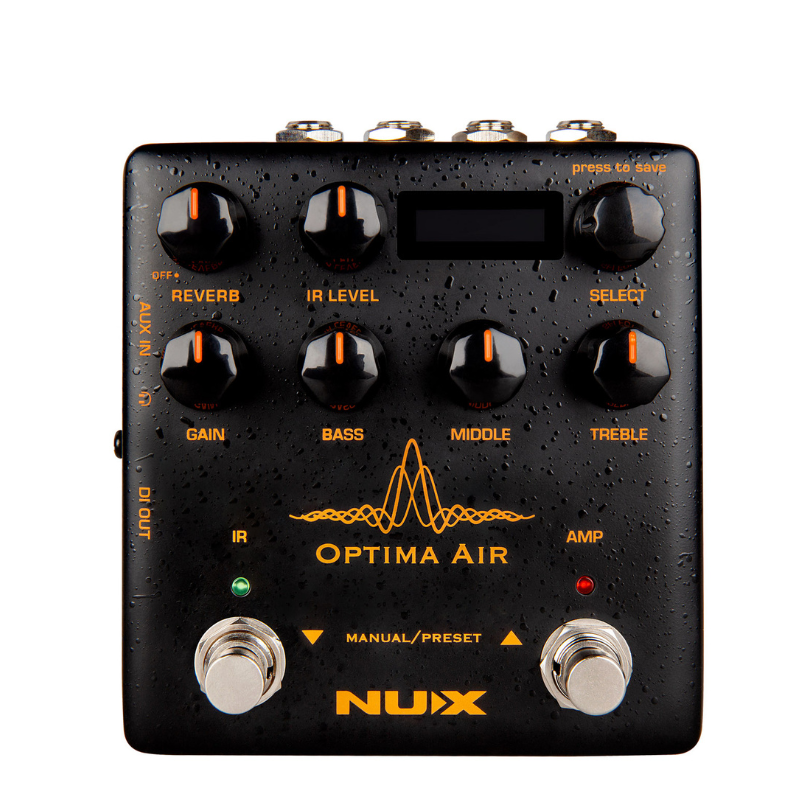
NUX Optima Air Acoustic Simulator & IR Loader NAI-5
$ 95.15
- 📦 Bulk discount savings
- 🛡️ Premium quality
- 💪 Durable and long-lasting
Related products
$ 91.51
Description NUX Optima Air is a dual-switch acoustic guitar simulator with a preamp for acoustic and electric guitar players. It simulates the acoustic guitar profiles with the best-optimized sound depending on your guitar and pickup type. IR loader combined with a preamp which is equipped with 3-band EQ and Gain controls. And there is an additional one-knob-control Reverb effect. If you want to connect any effect pedal you can use the SEND/RETURN effect loop and add the Optima Air into the signal chain. NUX Optima Air has a unique profile capture function, you can create your own acoustic guitar profile (IR file) by capturing your favorite acoustic guitar’s sound. There is an XLR DI output for direct line/mixer connection, headphones output for silent play and auxiliary input to connect a music player to play along. Reverb: One Knob Reverb effect control. It adjusts the Dry/Wet and Decay parameters. Or you can turn it OFF by tweaking to 0 IR Level: Adjusts the simulated signal (Impulse Response file) LEVEL Select (Push to Save): In manual mode, you can choose the IR file. And you can save your customized preset by pushing the knob Gain: Adjusts the signal input Gain level 3-Band EQ: – Bass: Adjusts the low frequency level – Middle: Adjusts the middle frequency level – Treble: Adjusts the high frequency level IR Footswitch: – Manual Mode: Engage/disengage the selected IR file. Acoustic guitar simulation ON/OFF – Preset Mode: Bank DOWN Also, if you are editing a preset, you can push the IR footswitch to exit without saving AMP Footswitch: – Manual Mode: Activates the pre-amp section. When you engage the AMP, you can use the Gain and the 3-band EQ – Preset Mode: Bank UP Also, If you are editing a preset, while you changing the preset name you can push the AMP footswitch and move the cursor to the next selection area to choose a letter, number or symbol. Specification Input: 6.35mm (1/4-inch) jack input. Output: 6.35mm (1/4-inch) jack output. Send/Return: 6.35mm (1/4-inch) effect loop inputs. Micro B USB Port: You can connect the pedal to your computer to use the Optima Air software to create, edit and save your presets. And update the pedal when a new firmware released. Power Input: 9V Negative TIP power adapter input . 3.5mm (1/8-inch) Auxiliary Input: You can connect music player to play along with music. 3.5mm (1/8-inch) Headphones Output: For silent practicing or recording. XLR DI Output: For direct connection to mixer (or PA system). – 24-bit, 48-kHz Sampling Quality. – Acoustic Guitar Impulse Response and Pre-Amp controls. – 15 built-in acoustic guitar profiles with IR level control. – 9 Preset Slots. – Reverb effect. – Gain, Bass, Middle and Treble controls. – 6.35mm (1/4-inch) Send/Return, effects loop. – 3.5mm (1/8-inch) Auxiliary input. – 3.5mm (1/8-inch) Headphones input. – XLR DI Out. – Micro B USB Port for USB Audio Stream and Edit Software.